
War log
Follow captures, losses and nuclear activity without leaving Discord. PICKET posts war events in your group's channel, covering the parts of the map you choose. Ordinary events are short messages; special alerts use colored cards so they are easy to spot.
An officer configures one subscription per server with /warlog settings. It is disabled by default and receives new events once enabled, without replaying earlier changes.
Who can do what?
Reading the war log only requires access to its Discord channel. Configuration uses the PICKET access levels configured for your server, rather than your ranks in the game.
| Access | What you can do |
|---|---|
| Anyone who can read the channel | Follow the published events. No command or button is needed. |
| Officer | Choose the channel, zones and reference faction; enable or pause the subscription. |
| Discord administrator | Everything an officer can do, plus manage access roles and export or delete server data. |
By default, administrators can configure the war log. An administrator can grant officer access in /picket settings → Permissions. See the permissions guide for details.
Your first subscription
Suppose your group wants to follow the West Coast and Centre.
- An officer runs
/warlog settings. The private panel can be opened from any channel on the server. - Choose the destination: select a regular text channel, for example
#war-log. - Choose your reference faction: Neutral (default), Colonials or Wardens. Then select West Coast and Centre.
- Click Confirm and enable. New events from those zones will appear in
#war-log.
The bot needs View Channel, Send Messages and Embed Links in the destination. Announcement channels, threads, forums and voice channels are not accepted. The current war must be available before activation.
Following events in the channel
Reading the messages
Each event produces one silent message, without a ping. A text line shows the faction's icon, event time, region, action, structure and location. Times are displayed by your Discord client.
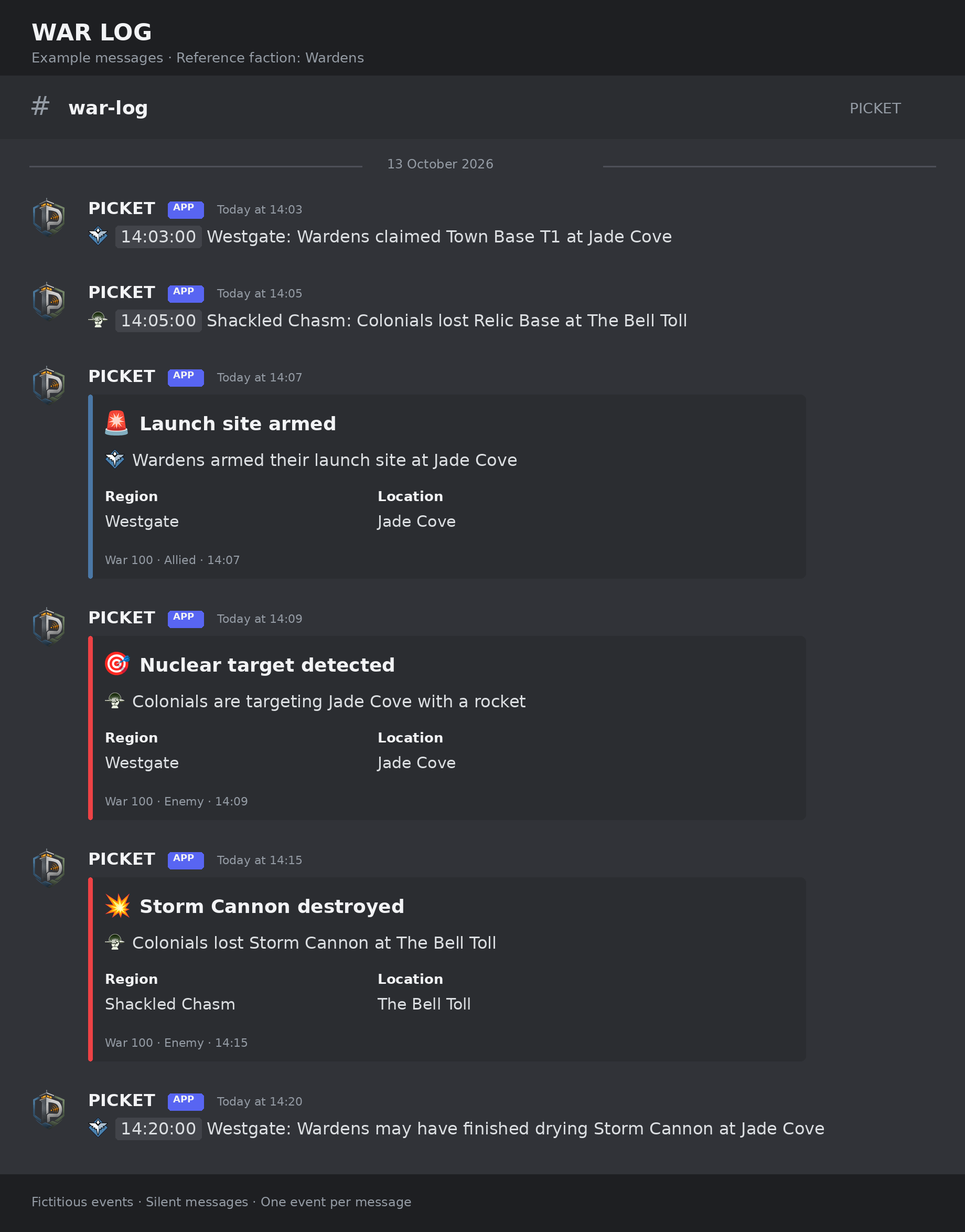
Illustration using the bot's English messages, with Wardens as the server's reference faction. Events are fictitious; the layout may vary with your Discord client.
| Event | How it appears |
|---|---|
| Captures, losses, upgrades and ordinary structures, including Intelligence Centers and Weather Stations | A text line |
| Storm Cannon built or destroyed | A colored card (embed) |
| Launch site, nuclear target, impact or scorched structure | A colored card per event |
| Estimated concrete drying | A text line |
| War ended | A card based on the winner's faction and your reference |
Notifications for ordinary structures still under initial construction are omitted. Upgrades and completed construction events are published. An impact and scorched structures remain separate messages.
Understanding the colors
Allied Wardens are blue, allied Colonials are green, and enemies are always red. Your reference faction determines which side is allied:
| Reference faction | Warden event | Colonial event |
|---|---|---|
| Wardens | Blue: allied | Red: enemy |
| Colonials | Red: enemy | Green: allied |
| Neutral | Gray | Gray |
This rule applies to every embed, including destruction, disarming and impact marker removal. A destroyed Warden Storm Cannon stays blue for a Warden server; a destroyed Colonial Storm Cannon stays red.
The footer also says Allied / Enemy / Neutral. Faction icons always identify the faction involved in the event. Choosing a reference faction does not filter out the other faction's events.
With Neutral selected, or unknown event ownership, embeds are gray. For scorched structures, faction identifies the previous owner, not the launcher. For a war-end announcement, the event's faction is the winner.
Watching concrete dry
When PICKET observes construction, it schedules an estimated drying notification:
| Structure | Time after detection |
|---|---|
| Storm Cannon | 48 hours |
| Intelligence Center | 24 hours |
| Weather Station | 24 hours |
The message says the concrete may have dried. Foxhole's public data does not provide the true construction time, so this is an estimate, rather than confirmation from the game. Destruction cancels the notification.
Adapting the subscription to your group
Choosing zones and changing settings
An officer opens /warlog settings. Changes apply to the whole server. Several selected zones feed the same channel; click a selected zone again to remove it.
Click View regions in each zone to see the regions covered by all five zones, then return to your settings. The selected Colonials button is green; the selected Wardens button is blue.
The war log also appears alongside Timers and Todolists on the home page of /picket settings. Enable opens the war-log panel so you can review the channel and zones before confirming. Disable asks for confirmation, pauses the subscription and cancels pending messages.
Once enabled, Configure reopens the war-log panel from /picket settings without changing its activation. When opened from PICKET, the panel and zone list include PICKET settings to return to the overview in the same private message. Saved changes are kept. Panels opened directly with /warlog settings do not show this button.
Available settings and defaults
| Setting | Choices | Default |
|---|---|---|
| Destination | One regular text channel. | None |
| Zones | One to three of West Islands, West Coast, Centre, East Coast and East Islands. | None |
| Reference faction | Neutral, Colonials or Wardens. | Neutral |
| Subscription | Enabled or disabled; activation requires a channel and zones. | Disabled |
Channel, zone and faction changes take effect immediately and cancel messages still waiting for the previous configuration. An already-started send can still arrive. Removing the final zone pauses the subscription.
Click Disable to pause, then Confirm and enable to resume. PICKET sends new events only after resuming. The panel belongs to the person who opens it and expires after 15 minutes without an update; reopen the command when needed. Messages follow the server's language setting in /picket settings, with Discord's server language and English as fallbacks.
Starting the next war
At each new war, PICKET pauses active subscriptions and posts one invitation to renew in their previous channel. Open /warlog settings, review or change the zones, then confirm and enable again.
The channel, zones and reference faction stay saved. You do not need to choose your faction again. There are no periodic reminders or messages replayed from before renewal. A restart during the same war does not require renewal.
Optional timer-board resets are configured separately in /timers settings → Board management. They are off by default and do not depend on renewing the war-log subscription. See the timers guide.
Limits
| Limit | Value |
|---|---|
| Destination channels per server | 1 |
| Subscribed zones | 1 to 3 out of 5 |
| Event grouping | None: one event per message |
| Notifications | Always silent |
| Catch-up after a pause or collection outage | None |
Under normal operation, PICKET aims to deliver an isolated event within two minutes of detecting it. This does not include the time before Foxhole publishes the change. Outages, inaccessible channels or sustained overload can delay delivery.
If something goes wrong
| Situation | What to do |
|---|---|
| You cannot open or change settings | Check your PICKET officer access and whether the server is suspended. |
| The destination is refused | Choose a regular text channel and check the bot's View Channel, Send Messages and Embed Links permissions. |
| The current war is unavailable | Try enabling again later. The channel, zones and faction can already be saved. |
| No events appear | Check that the subscription is enabled for the current war and covers the zones you want. |
| The channel was removed, converted or became inaccessible | Publication is paused. Restore permissions or choose a valid channel, then enable again. |
| Events are delayed | Temporary Discord errors are retried; pending messages can arrive later. |
| There is a gap after an outage or restart | PICKET refreshes its view of the map and resumes with subsequent changes. Missing events are not replayed. |
| A new war started and messages stopped | Open /warlog settings and renew the subscription. Your reference faction is preserved. |
What PICKET stores
PICKET saves the server's channel, zones, reference faction, language and subscription state, delivery information and configuration audit entries. An administrator can export these records or request their deletion in /picket settings → Data. Deleting the bot's data does not automatically delete Discord messages.
Public game observations and recorded events are shared between servers and retained for the current and preceding observed wars. Deleting one server's data does not erase that shared game history. See the Privacy Policy for the general retention policy.