
Voice statistics
Find the hours when your group gathers, check your own presence or prepare the next briefing: voice statistics give you a view of your regiment's activity, per person and server.
The official instance's dashboard is at stats.picket-foxhole.com. You can also open it with /stats link, then sign in with Discord.
Collection is disabled by default. An administrator chooses which member roles to track, then an officer can enable it. History starts at activation and covers at most a rolling 60-day window.
The instance admin voice view uses a scheduled snapshot, refreshed at midnight and noon by default in the instance timezone. “Data as of” shows its timestamp; connected people refer to that snapshot. Changing the period or channel reads the same snapshot. Member and officer views remain current. An erasure or purge invalidates the snapshot immediately; the admin view is temporarily unavailable while the worker replaces it. The rolling 60-day display limit still applies.
Who can do what?
Configuration and Discord exports use the PICKET access levels configured for your server, rather than your ranks in the game. In the dashboard, any current server member can see the overview and their own data, even if they do not hold a tracked role.
| Access | What you can do |
|---|---|
| Server member | View server totals and your own activity; manage tracking and erase your statistics in the dashboard. /stats link and /stats privacy require PICKET member access. |
| Officer | Everything a member can do, plus view and export individual data for this server; enable or disable collection and choose excluded channels. |
| Discord administrator | Everything an officer can do, plus choose tracked member roles and manage general permissions. |
| Instance administrator | View statistics across this instance's servers, including retained history for inactive servers until erasure. |
Tracked member roles are shared with general permissions: adding or removing them in Stats settings also changes access to member commands. An administrator configures officer roles in /picket settings → Permissions. See the permissions guide for details.
Instance access belongs to members who have accepted the invitation to the Team owning the bot application, including developer and read-only Team roles. A pending invitation is insufficient. Officer access in one server does not grant access to individual data in other servers.
Successful Discord membership, role and Team checks are reused for up to five minutes during ordinary dashboard navigation. Your session and PICKET's local permissions are still checked on each request. Exports force fresh Discord checks; expired access results are never used to authorize new reads during an outage.
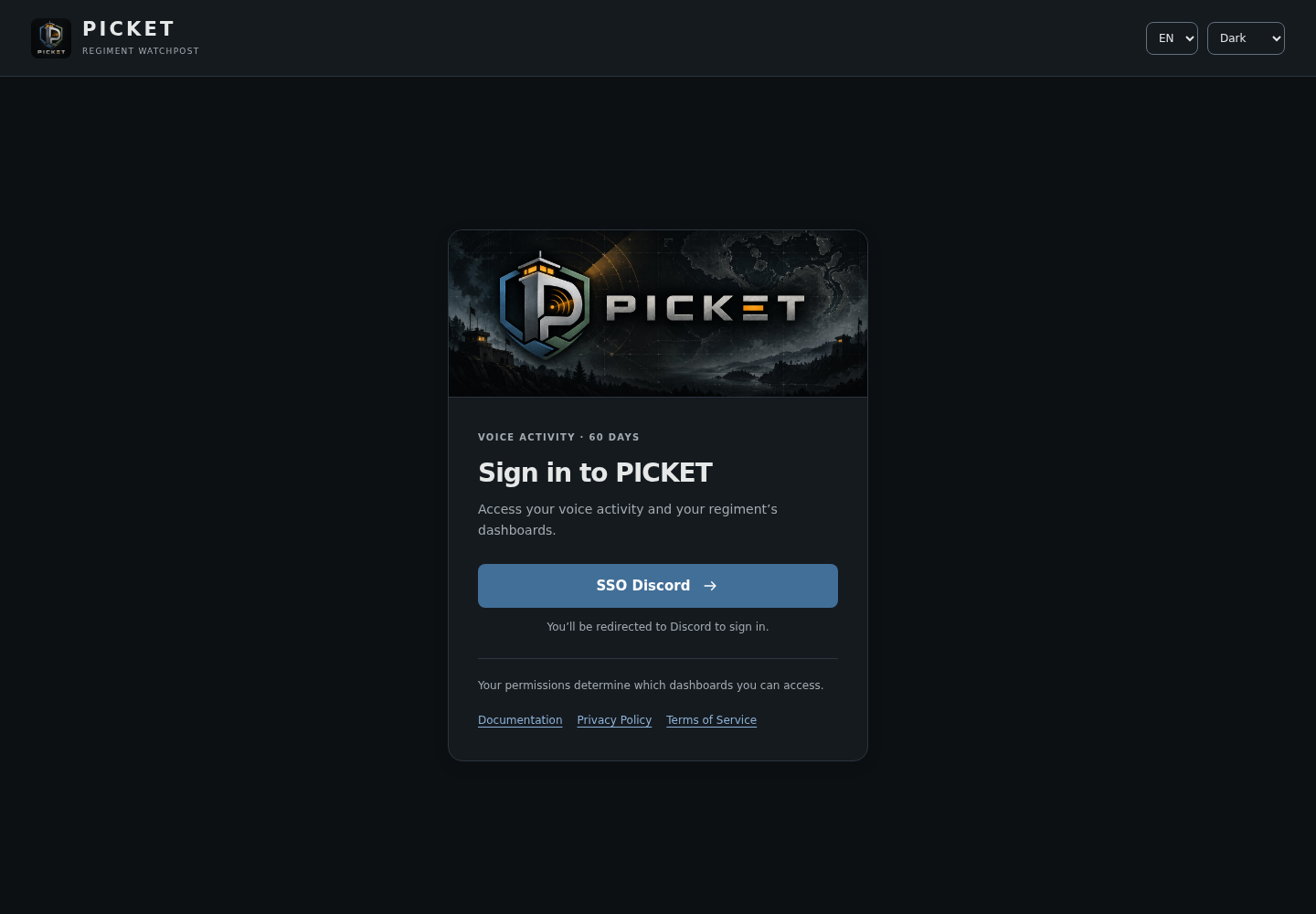
Sign in with your Discord account. Your permissions determine which dashboards you can access.
Your first statistics
Give PICKET View Channel on the voice channels to track, including private channels and their category overwrites. This lets the bot receive channel metadata and names. It does not need Connect, Speak or Administrator for statistics. OAuth dashboard access checks use your account's guilds.members.read scope, independently of the bot's channel permissions.
Suppose your group uses the Member and Logistics roles and wants to exclude the Break room channel.
- An administrator opens
/stats settings, from any channel in the server. This panel is also available in/picket settings→ Statistics. - Add member roles: use Add a role to add Member, then Logistics. Each addition keeps the roles already configured. A person holding either role will be tracked. Use Remove a role to remove a specific role, including
@everyoneif present. These roles also define PICKET's general member access. - Choose excluded channels, such as Break room. Bots and the native AFK channel are already excluded.
- Click Enable. Eligible joins, leaves and channel changes begin contributing to statistics; earlier history is not imported.
- Open the dashboard or run
/stats link, click SSO Discord, then choose your server and a period.
Choose actual member roles
An empty list or @everyone, even alongside other roles, prevents activation. An administrator must add specific member roles and remove @everyone before enabling statistics. Removing the last role disables collection. Inform members about tracking before activation.
For a self-hosted instance, /stats link points to its operator's configured dashboard. The official address above does not provide access to other instances' data. Technical setup is covered in the self-hosting guide.
Following activity in the dashboard
Seeing PICKET's deployment
Open Overview → PICKET to see how many Discord servers are currently active on this instance, and how many have Timers, TodoLists, Warlog, Voice stats or Temporary voice channels enabled. Feature cards and adoption bars show counts and percentages of active servers. This shared overview is available to every signed-in user and refreshes each minute; Refresh updates it immediately.
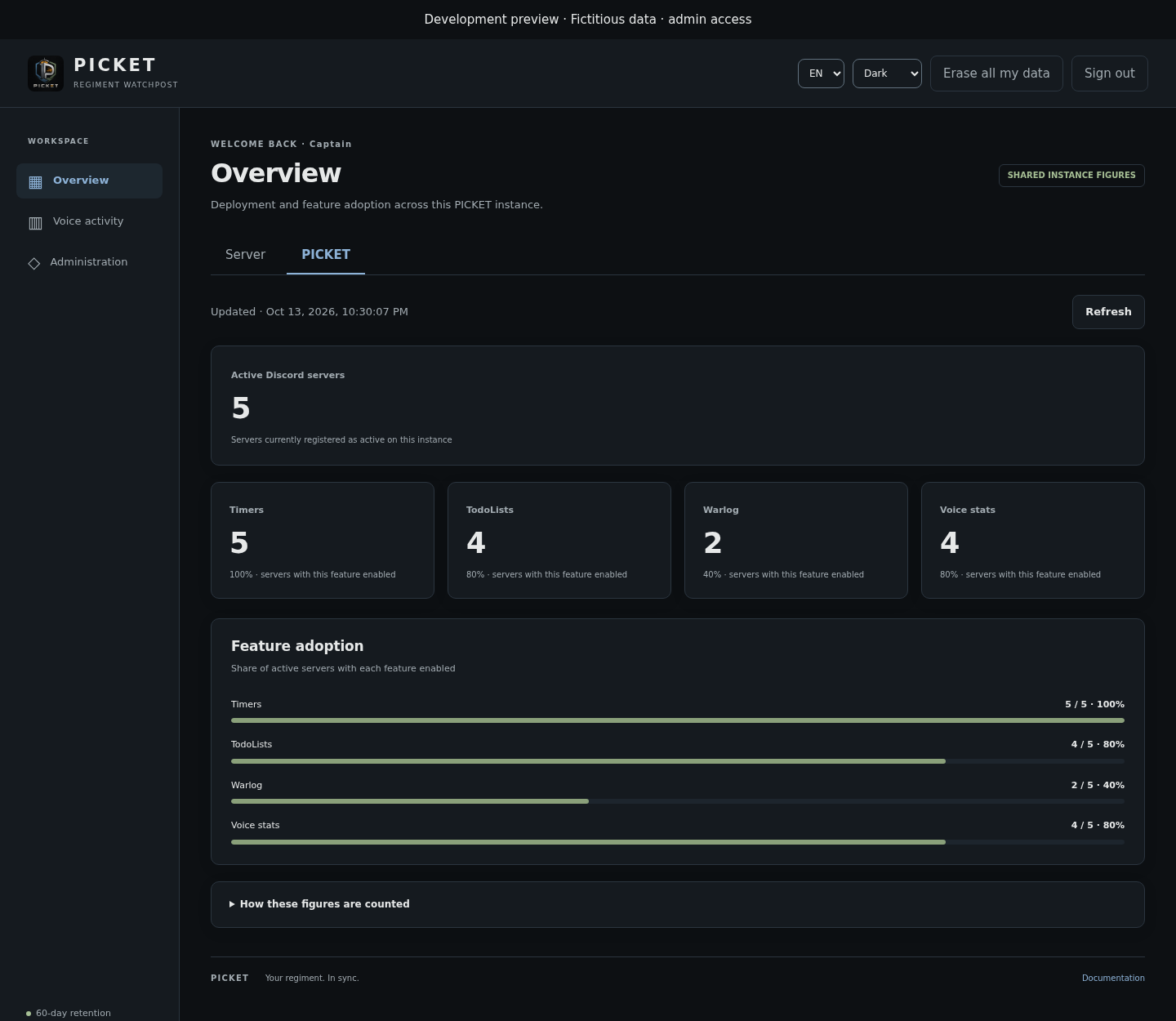
English preview with fictitious data. Only aggregate deployment figures are shared.
These figures describe current configuration, rather than actual feature use over a period. Servers where PICKET has left or been suspended are excluded. Disabling voice tracking does not remove a server from PICKET's active deployment count. Several features can be enabled in the same server, so their counts overlap. This view is independent of voice period and channel filters and grants no access to other servers' names, settings or individual histories.
Reading the overview
Choose Overview to see server totals without displaying individual histories. Cards summarise cumulative time, active people, presence segments and people currently in voice. Charts show daily activity and the channels where the group gathers.
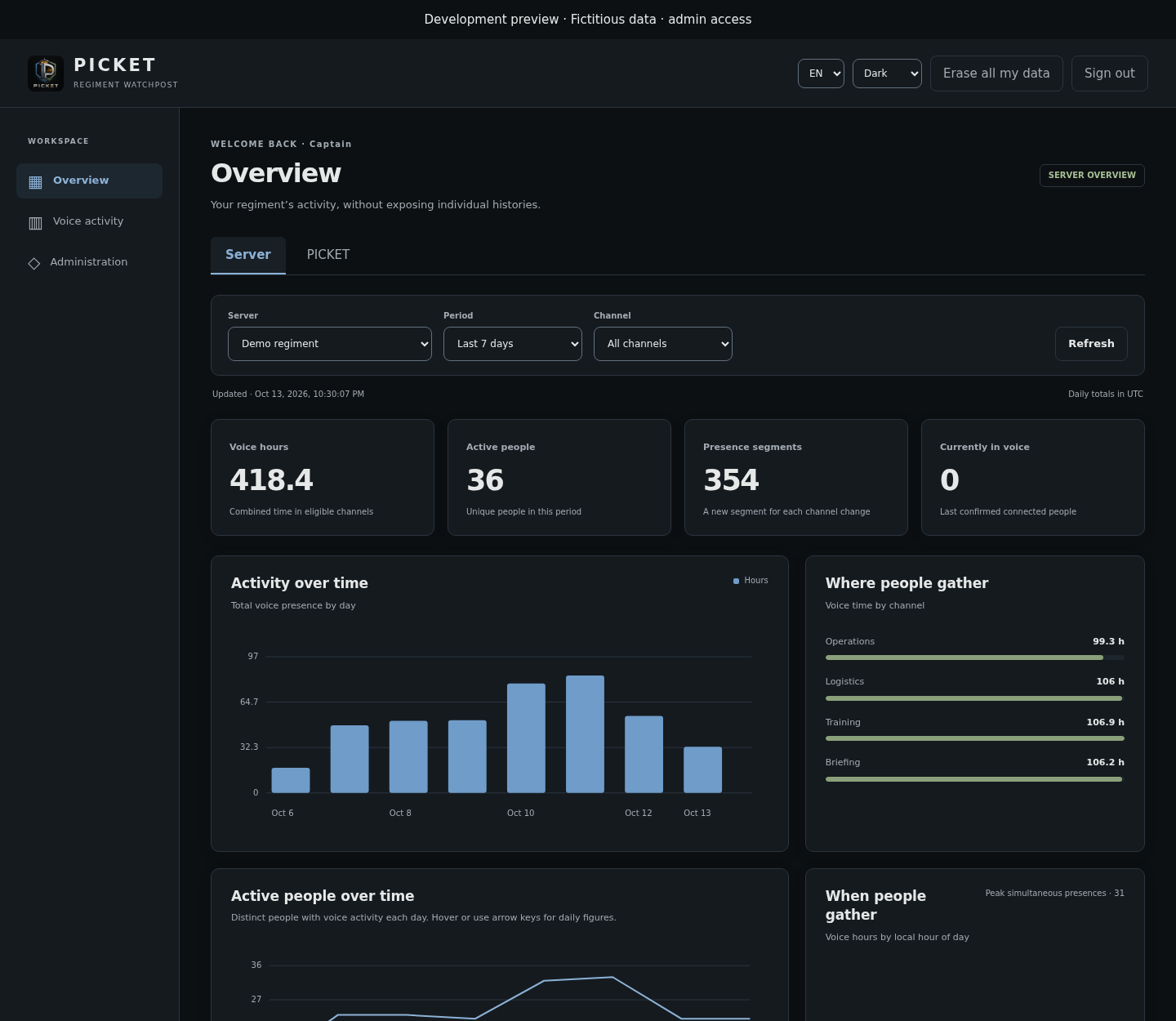
Illustration using a fictitious regiment and data. The overview shows server totals; individual histories do not appear in this view.
| Indicator | How to read it |
|---|---|
| Voice hours | Combined time of all eligible people in the period. Two people present for one hour contribute two voice hours. |
| Active people | Distinct people with recorded presence during the period. |
| Presence segments | Continuous presence in one channel. Moving to another channel starts a new segment. |
| Currently in voice | Latest connected presences confirmed by collection. |
| Peak simultaneous presences | Highest number of presences at the same time in the period and selected scope. |
Daily and hourly totals use the server's configured time zone in /picket settings, including daylight saving changes. The global instance view uses UTC. Voice time means presence, rather than speaking time or proof of playing. Muting, deafening, video and screen sharing do not create extra segments.
The dashboard refreshes every minute, with normal freshness targeted under two minutes. The last confirmation time stays visible. Interruptions are marked, and unobserved time is not automatically added.
Viewing your activity or the regiment's
Open Voice activity. A member sees only their own data in the selected server. If they belong to several servers using this instance, they can switch between them using the Server filter.
An officer or Discord administrator can choose My activity or Regiment activity. The table shows voice time and last presence for each person they are authorised to view; recent presences detail joins, leaves or the last confirmed time.
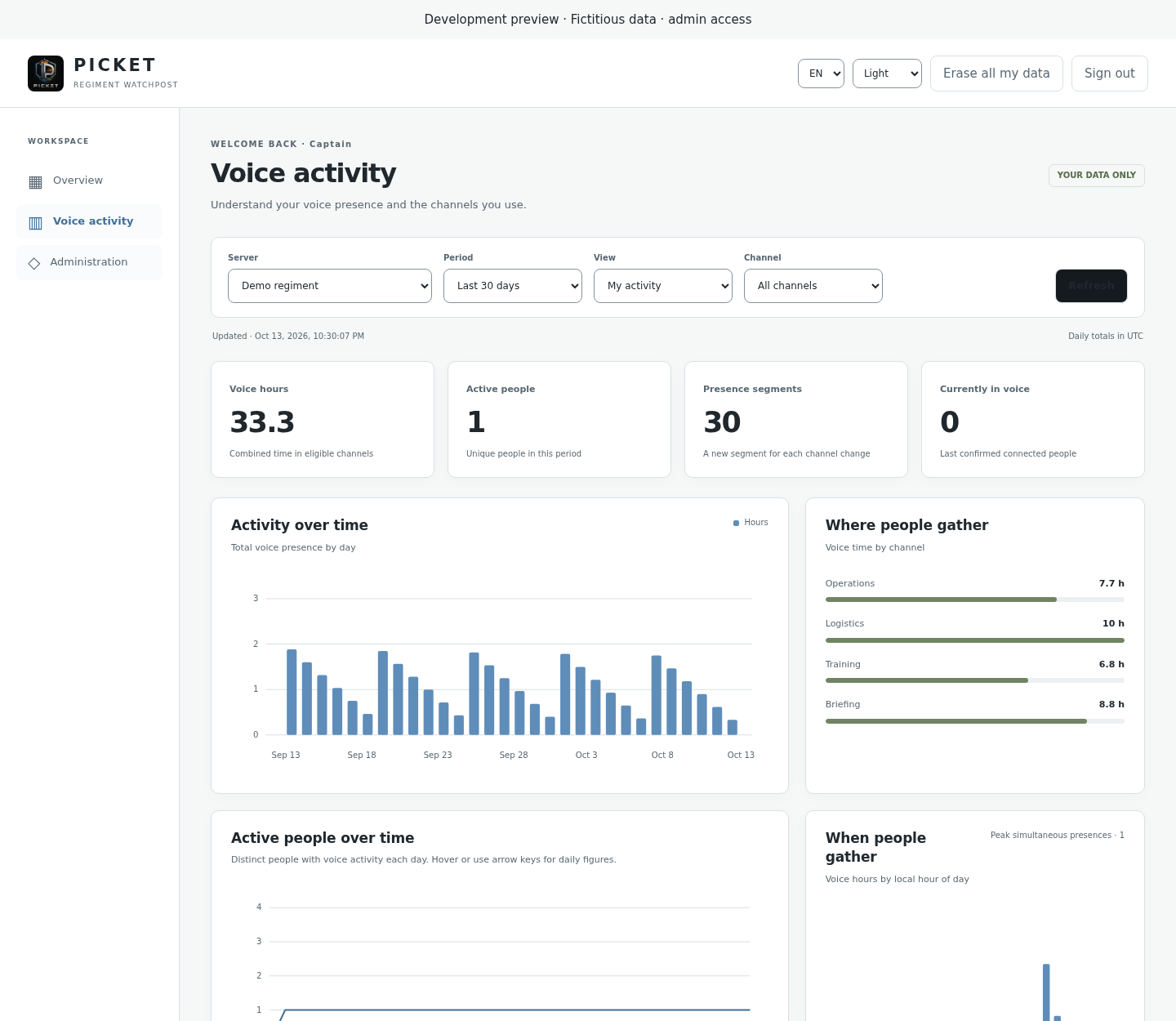
Illustration of the personal view with fictitious data. The Server filter determines which history is displayed; access is rechecked by the service.
Tables are paginated beyond 1,000 people. Recent presences show the latest 100 segments in the period. No observed activity does not mean never active: the person may not have been targeted, may have opted out, or may have used an excluded channel.
Comparing servers across the instance
In Administration, selecting a specific server shows the current Timers, TodoLists, Warlog and Voice stats enabled/disabled states above the voice metrics. These settings are independent of the period and channel filters. This view is reserved for PICKET instance administrators.
Instance administrators can open Administration and select All servers. The daily voice chart stacks one coloured series per Discord server: the height of the stack is the instance's total voice hours for that day. The Active people over time chart shows one curve per server and a dashed instance total, counting each person once even when they used several servers that day. Hover over a chart, or focus it and use the arrow keys, for daily figures.
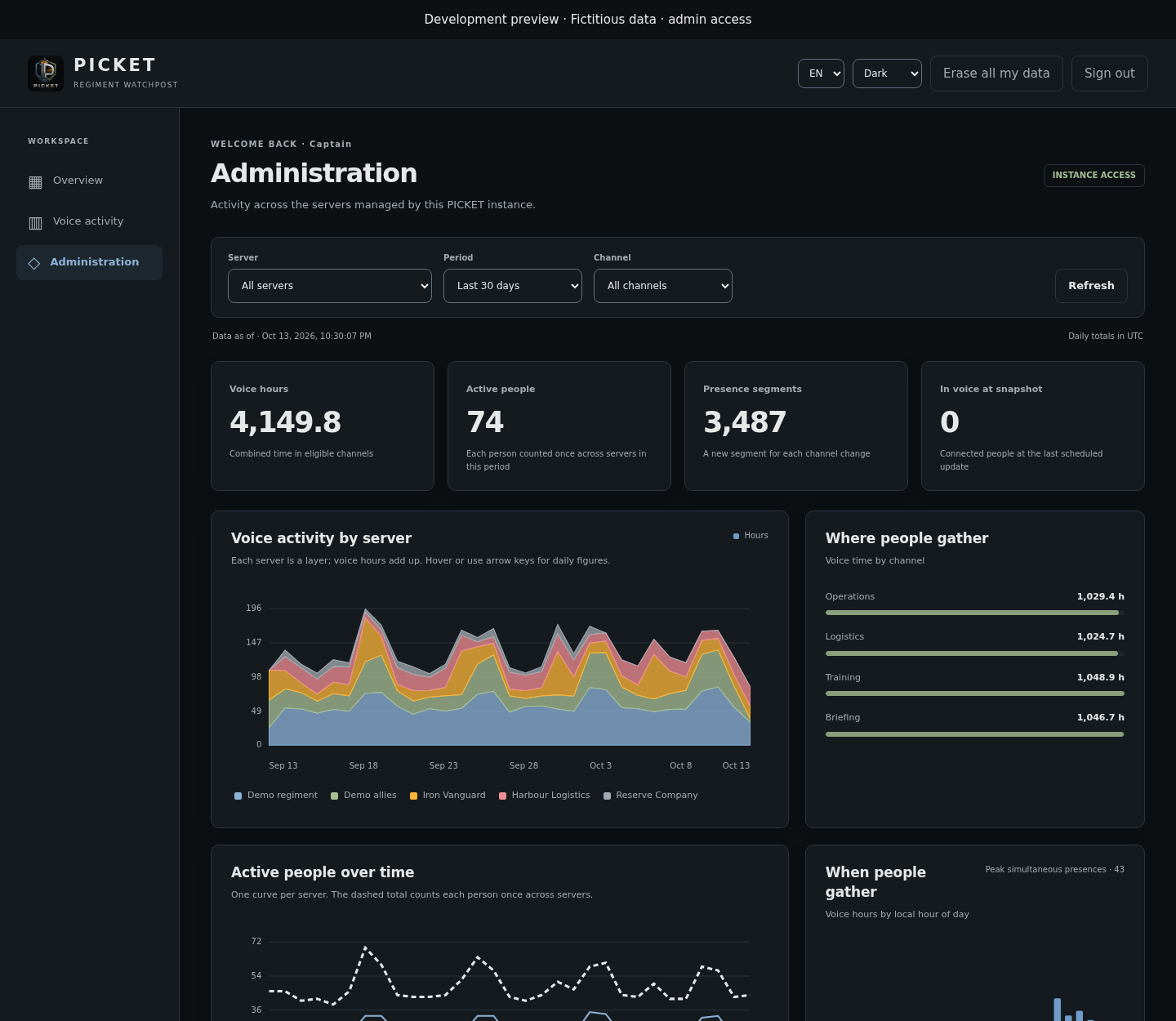
English preview with fictitious data. Colours distinguish servers; the dashed people curve is the deduplicated instance total.
Activity by server also lists voice hours and distinct active people across the whole selected period. An officer sees those metrics for their selected regiment in Regiment activity, within their existing server permissions. These counts describe people with recorded voice activity, rather than the full membership of the target roles.
Instance administrators can also select retained inactive servers. They appear after active servers, in grey with an Inactive label, and remain selectable until their data is erased. PICKET keeps their last known Discord name; names missing from older records are recovered when Discord still provides them. If a name was never saved and is no longer accessible, the selector explicitly displays Unknown server with its ID. Disabling voice tracking alone does not mark a server inactive.
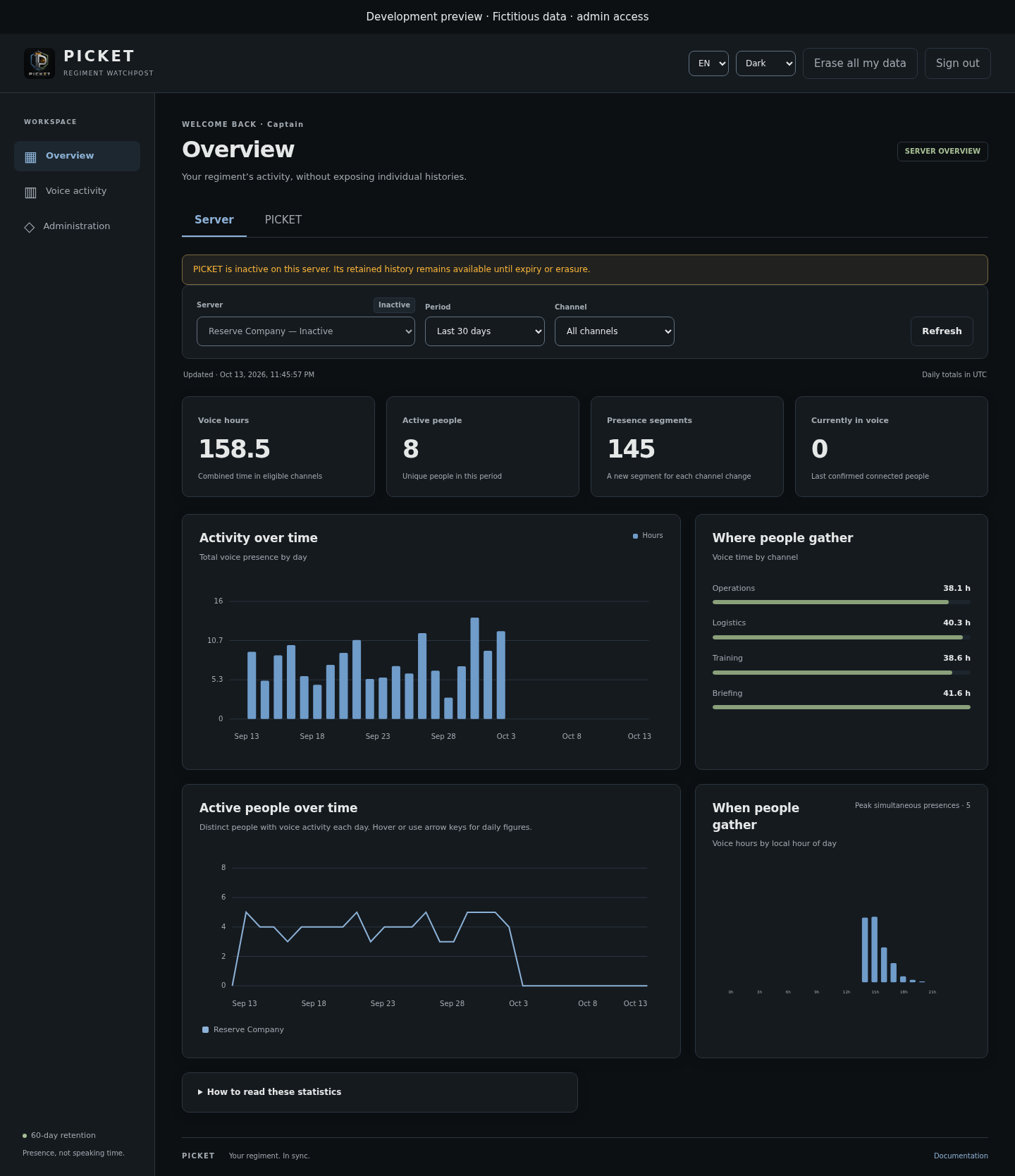
Fictitious data illustrating a retained inactive server; instance administrator access is required. Daily people counts cannot be added to obtain the period's distinct people count, and server counts cannot be added to obtain unique people across the instance. Period and channel filters, the 60-day window and erasure apply to all these views.
Adapting tracking to your group
Choosing people and channels
An officer opens /stats settings to enable or disable collection and change excluded channels. Only a Discord administrator can add or remove tracked member roles, one at a time, just like in /picket settings → Permissions. The panel is private, belongs to the person who opens it, and its controls expire after fifteen minutes; run the command again if needed.
You can also open the panel from /picket settings: Enable opens settings for an inactive module, and Configure reopens an active module without changing its activation. In this path, PICKET settings returns to the overview in the same private message and keeps saved changes. This button is absent when opened directly with /stats settings and is not part of the personal /stats privacy panel.
Available settings and defaults
| Setting | Choices | Default |
|---|---|---|
| Collection | Explicit activation per server. | Disabled |
| Tracked people | At least one selected member role; @everyone is forbidden. | General permission member roles |
| Bots | Always excluded. | Excluded |
| Native AFK channel | Always excluded. | Excluded |
| Other excluded channels | Select voice or stage channels; Clear exclusions removes the selection. | None |
| Dashboard period | 24 hours, 7, 14, 30 or 60 days, or custom dates. | 7 days |
| Dashboard interface | English or French; light, dark or system theme. | Browser language and system theme |
Gaining a target role while connected starts tracking; losing the last target role stops it. Changing the selection affects future collection. Previously recorded history remains until expiry or erasure. If the selection becomes empty or includes @everyone, collection stops automatically.
Exporting statistics
In Voice activity, choose the server, period, channel and view, then click Export CSV or JSON. A member exports their own data; an officer exports regiment data only in servers where they hold that access.
To choose dates, select Custom…, fill in From and Through, then click Apply. Both dates are included in the server's configured time zone; All servers uses UTC. A day can therefore last 23 or 25 hours across a daylight-saving transition. Today covers activity recorded so far. Available start dates are fully retained days within the rolling 60-day window; the first partially expired day cannot be selected. The effective period is displayed with times and an exclusive end. Unapplied field edits change neither figures nor exports. Downloads use the exact bounds of the displayed report. If part of that report has since expired at the 60-day boundary, the download contains only the retained portion: a message identifies the adjusted bounds, which also appear in its file name. Refresh to see the corresponding figures.
The global Administration view stops at the latest scheduled snapshot: a period extending beyond it is marked as partial; a period entirely after it is reported as not yet available. Current voice connections and collection status remain independent of the historical period selected.
In Discord, an officer can use /stats export days:7 format:csv to receive this server's statistics privately. days accepts 1–60; format accepts CSV or JSON. /stats status shows settings and retention.
For custom dates, use /stats export start:2026-10-10 end:2026-10-15 format:csv, for example. start and end must be supplied together as YYYY-MM-DD, and cannot be combined with days. Dates are inclusive in the server's time zone, with the same limits as the dashboard. Without a period, the last 7 days remain the default. The private reply includes the bounds and time zone; the file name includes the exact UTC bounds. CSV columns and the JSON structure remain unchanged.
Oversized exports return a message asking you to narrow the period or choose a channel in the dashboard. Access is rechecked before export. Recipients are responsible for retention of downloaded files.
Both Discord and dashboard downloads use the same format: a JSON array of people, or one CSV row per person. Durations are seconds and timestamps are UTC. Instance-wide administrator exports add guildId / guild_id to distinguish each server.
[
  {
    "userId": "407197937387700225",
    "username": "elchap1567",
    "totalSeconds": 49353,
    "lastActivityDate": "2026-10-13T04:33:10+00:00"
  }
]user_id,username,total_seconds,last_activity_date
407197937387700225,elchap1567,49353,2026-10-13T04:33:10+00:00Managing your data
A Discord administrator can download the server data export in /picket settings → Data. It includes Stats settings, tracking preferences, a stats_summary overview and a stats_members array with one row per member: userId, username, totalSeconds and lastActivityDate. Voice totals cover at most 60 days, even before physical cleanup. pendingEvents and lastPendingActivityDate describe voice data still awaiting processing; unconfirmed time is not added to the totals. Raw voice events, individual segments and disk journal entries are not listed. An oversized export is refused in full. At the server's scheduled deletion, queued voice facts and tracking markers are erased too; an erasure failure keeps the server registered for retry. This server data export includes the bot's other features too; the CSV/JSON downloads above contain only voice summaries.
Open Your data, your choice in the dashboard, or use /stats privacy in Discord.
| You want to… | Do this |
|---|---|
| Stop future collection | Check Exclude me from future tracking, then Save preference. Existing history remains until expiry or erasure. |
| Resume tracking | Uncheck the option and save; target role and channel filters still apply. |
| Erase your history in the selected server | Click Erase my statistics, then confirm. In the dashboard, type DELETE. |
| Erase your data across this instance, including after leaving a server | Click Erase all my data at the top of the dashboard and confirm. This also opts you out in the affected servers. |
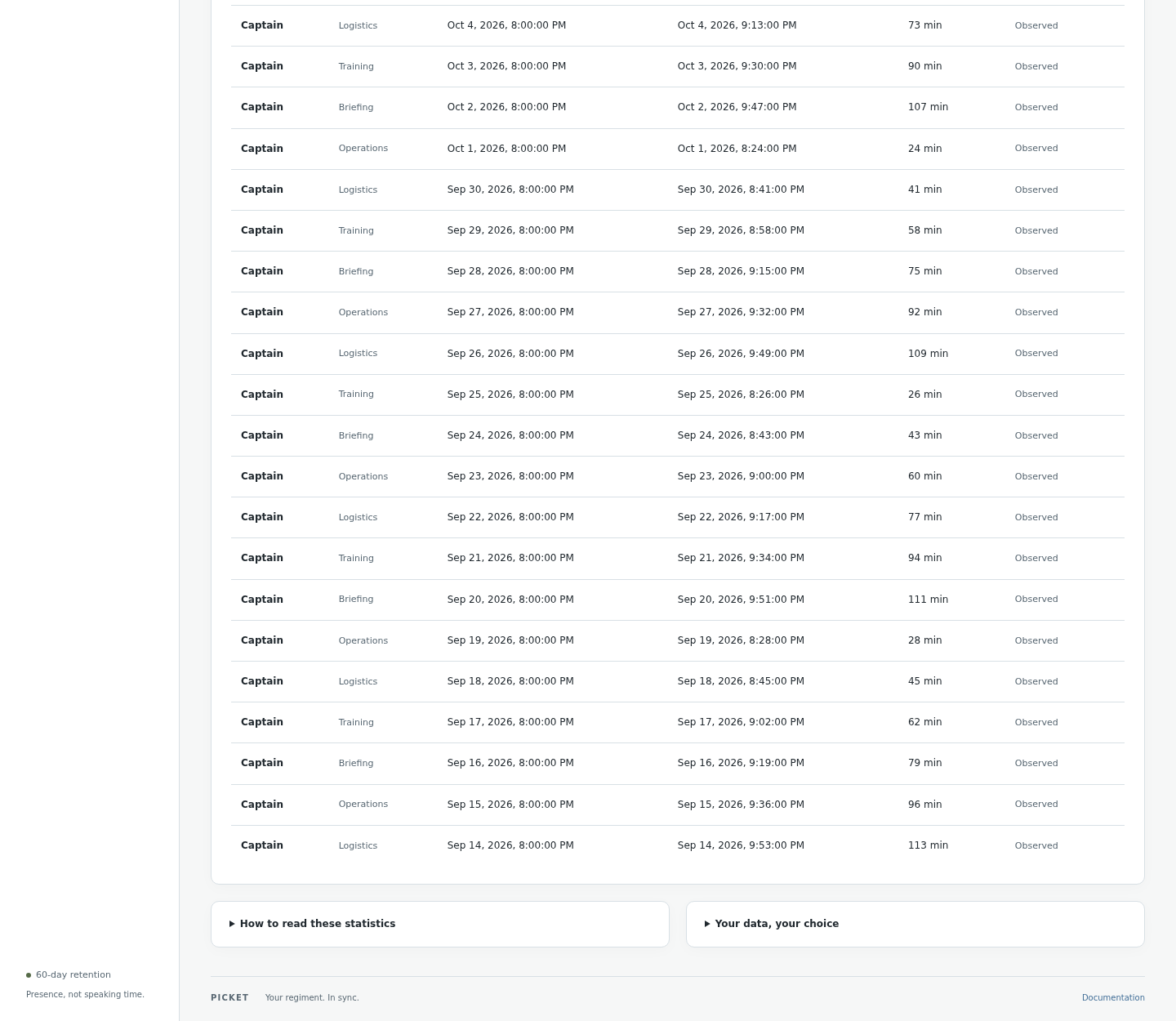
Illustration with tracking voluntarily disabled for the fictitious account. Erasure is confirmed separately, removes your contribution from totals, and deletes pending records too.
Limits
| Limit | Value |
|---|---|
| Available history | Rolling maximum of 60 days |
| Tracked roles | Add or remove one at a time; at least one required to enable collection. Removal choices are paginated, 25 per page. |
| Channels in the exclusions selector | Up to 25 |
| People per table page | 1,000 |
| Recent presences displayed | Latest 100 segments in the period |
| Dashboard CSV/JSON export | Up to 10,000 people |
| Discord CSV/JSON export | Up to 1,000 people |
| Dashboard refresh | Every minute; Refresh button available |
Discord or bot interruptions can leave gaps. Already received observations can be recovered, but an unknown duration is not reconstructed. The collection warning clears after pending observations have been replayed, presences reconciled and a new collection checkpoint saved. Past interruptions remain in presence details. This live status is independent of the selected period and the scheduled Administration snapshot; paused collection and departed servers are excluded. A separate warning appears when collection has not been confirmed for more than three minutes. The dashboard refreshes each minute. There is no complete member directory or ranking that proves a member's inactivity.
If something goes wrong
| Situation | What to do |
|---|---|
| Activation is blocked | An administrator must choose actual member roles and remove @everyone from the selection. |
| You cannot change roles | Role changes require Discord administrator access, even if you are an officer. |
| The dashboard offers no server | Check that PICKET is installed and active there, that you are a member, and that you are using the correct instance. |
| No activity appears | Check activation, target roles, excluded channels, your tracking preference and the selected period. |
| You cannot see other people's data | Select Regiment activity if you are an officer or administrator of that server; otherwise, the view stays personal. |
| Figures are delayed or an interruption is shown | Check the last confirmation and try Refresh later. Unobserved time will not be automatically added. |
| Your access has just changed | Discord membership, roles and Team access may take up to five minutes to renew during normal navigation. Exports recheck them immediately; local PICKET permission changes apply on the next request. |
| Discord limits access checks | The countdown pauses affected requests and retries when the delay expires. Previous figures remain visible only for the same server and filters. Privacy actions stay disabled during the wait; your recorded preference is unchanged. |
/stats link offers no link on a self-hosted instance | Its operator must configure the dashboard. |
| An export is too large | Narrow the period or choose a channel; no partial file is presented as complete. |
What PICKET stores
PICKET keeps server, user and channel identifiers, voice event timestamps and presence segments. Display names of tracked participants and channel names make reports readable. Temporary connected human state, including roles, supports eligibility changes and recovery without maintaining a complete member directory.
Channel names are retained across bot restarts. If only an ID was recorded, PICKET retrieves the name from Discord when available and updates the existing reports. A deleted or inaccessible channel keeps its last known name; an ID remains when no name was ever available. Updating a name does not extend the history retention period.
Server, channel and participant names follow Discord renames, including participants who have disconnected. Reports and exports use the latest known label for the same ID, without splitting activity into duplicate entries. A participant's server nickname takes precedence over their Discord display name, then their username. Gateway updates apply as they arrive. Periodic verification also rotates through active servers and retained participants/channels, with at most five Discord requests per ten-second pass. A completed sweep waits thirty minutes before starting again; covering every retained participant takes longer on larger instances. No complete member directory is downloaded. Deleted or inaccessible entities keep their last known name, and name verification does not extend retention or recreate erased data. The dashboard renews server labels every two minutes while active, preserving your selected server.
All statistical history and derived reports are limited to a rolling 60-day window. Disabling collection keeps that history until expiry. Settings and opt-out preferences are kept separately to honour your choice. Erasure removes your history, its report contributions and pending records.
Statistical history is excluded from standard backups so they cannot extend retention. Settings and preferences remain backed up; losing the database volume means losing that history. An administrator can also export or request server data deletion in /picket settings → Data. See the Privacy Policy for the general retention rules.